

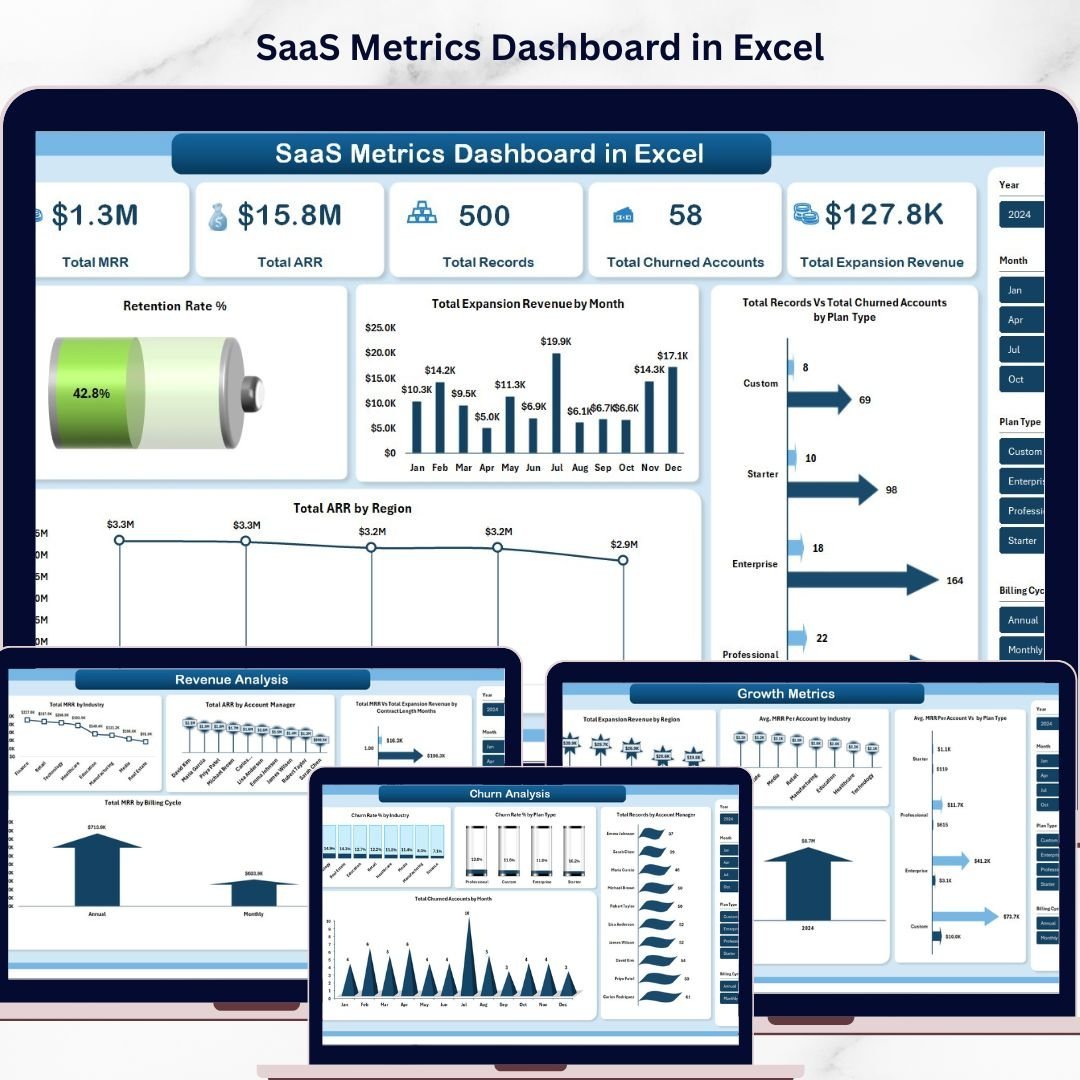


SaaS Metrics Dashboard in Excel is a professionally designed, pivot-powered analytics template built for SaaS founders, revenue operations managers, customer success leaders, and finance teams who want to monitor MRR, ARR, churn, expansion revenue, and customer health from a single dynamic interface. This Excel Dashboard transforms raw subscription data into actionable visual insights that help you make smarter growth decisions 🚀. Simply open the file in Microsoft Excel, replace the sample data with your own, click Refresh All, and watch your entire dashboard update automatically.
This template includes 5 interactive dashboard pages covering Overview, Revenue Analysis, Customer Health, Churn Analysis, and Growth Metrics — plus a Data Sheet and a Support Sheet with pivot tables that power the entire dashboard dynamically. Whether you are tracking monthly recurring revenue, analyzing churn patterns by industry, or measuring expansion revenue by region, this SaaS Metrics Dashboard in Excel gives you complete visibility into your subscription business with dynamic charts, KPI cards, and slicer-based filtering.
🔑 Key Features of SaaS Metrics Dashboard in Excel
📊 5 Interactive Dashboard Pages – Navigate between Overview, Revenue Analysis, Customer Health, Churn Analysis, and Growth Metrics tabs to explore SaaS performance data from every angle.
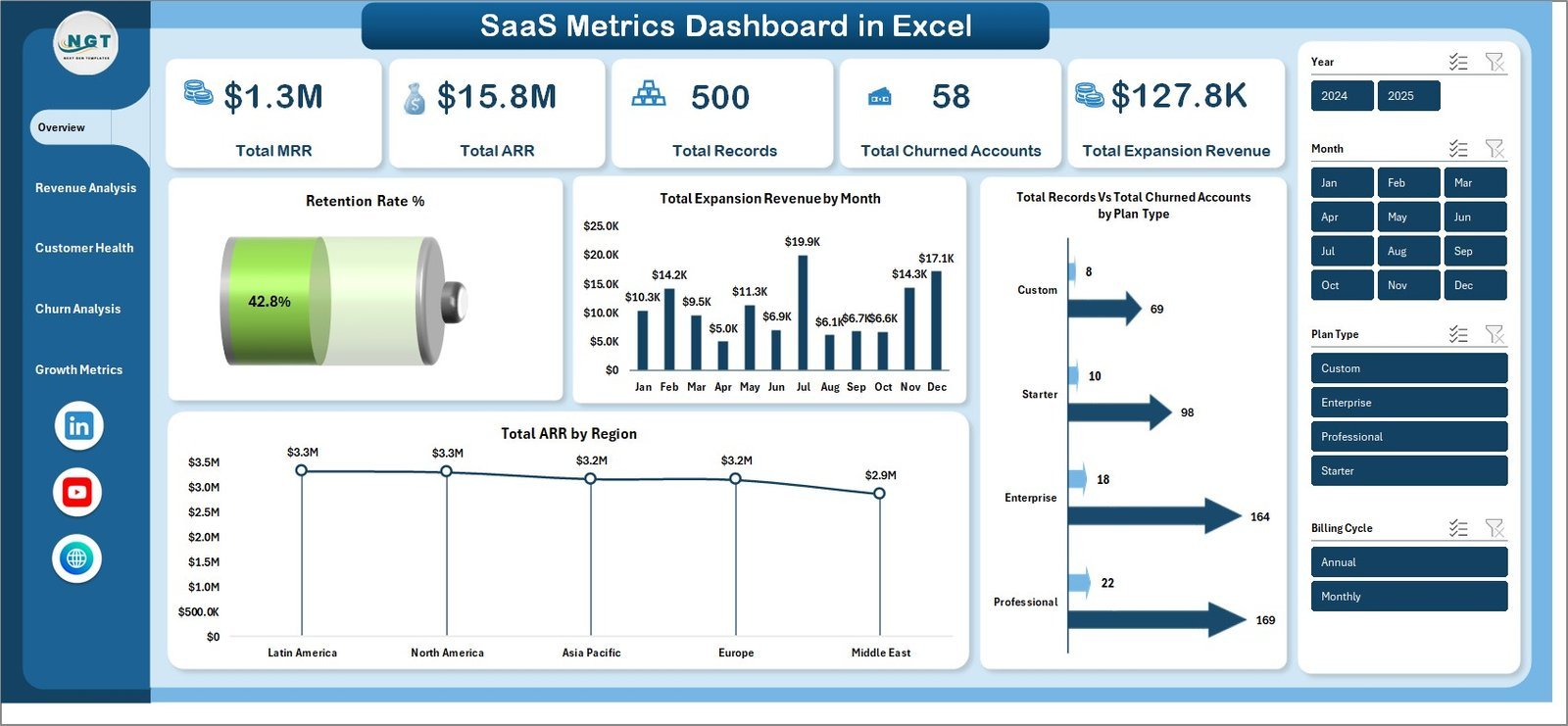
📈 5 Dynamic KPI Cards – Track high-level metrics at a glance including Total MRR, Total ARR, Total Records, Total Churned Accounts, and Total Expansion Revenue on the overview page.
🔍 Advanced Slicers and Filters – Filter the entire dashboard instantly by plan type, region, industry, account manager, billing cycle, and more for targeted SaaS analysis.
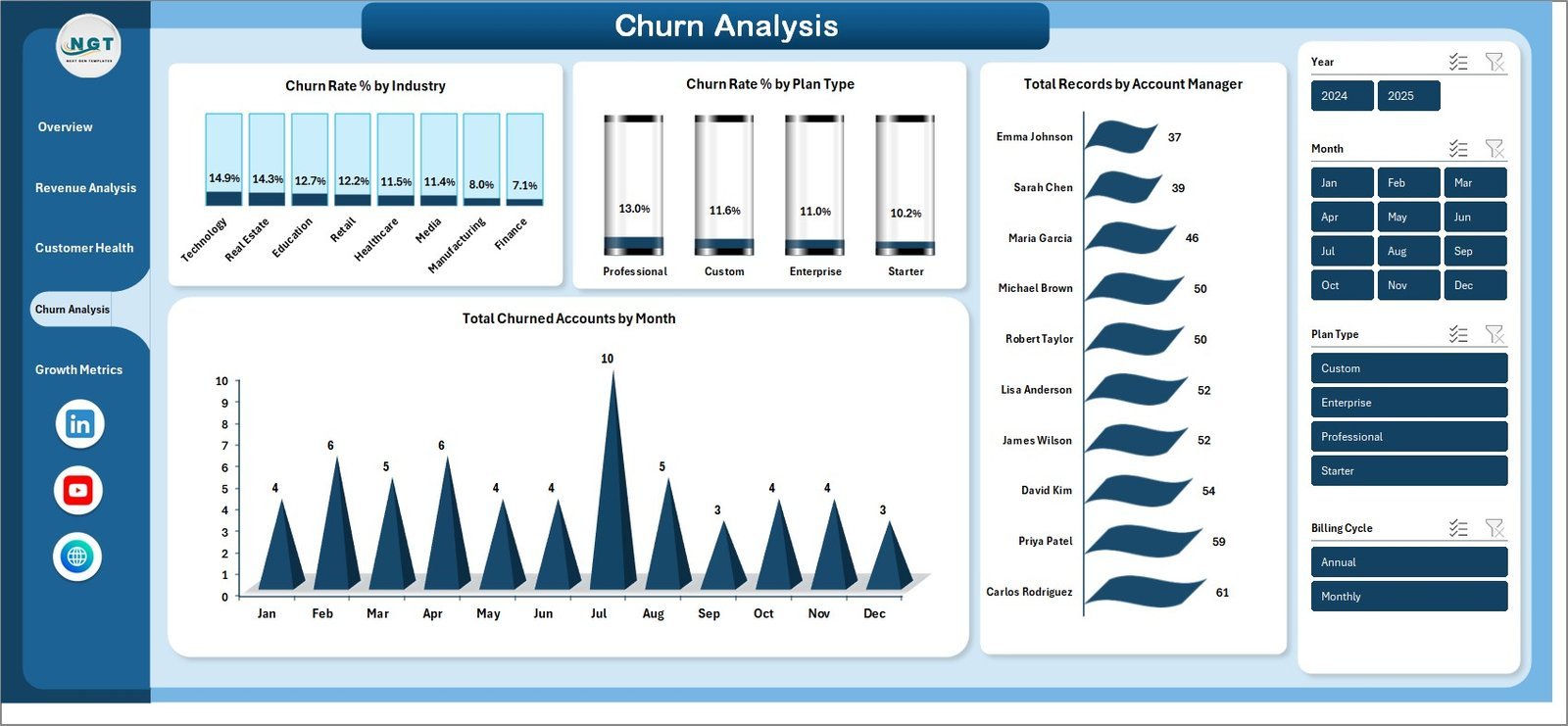
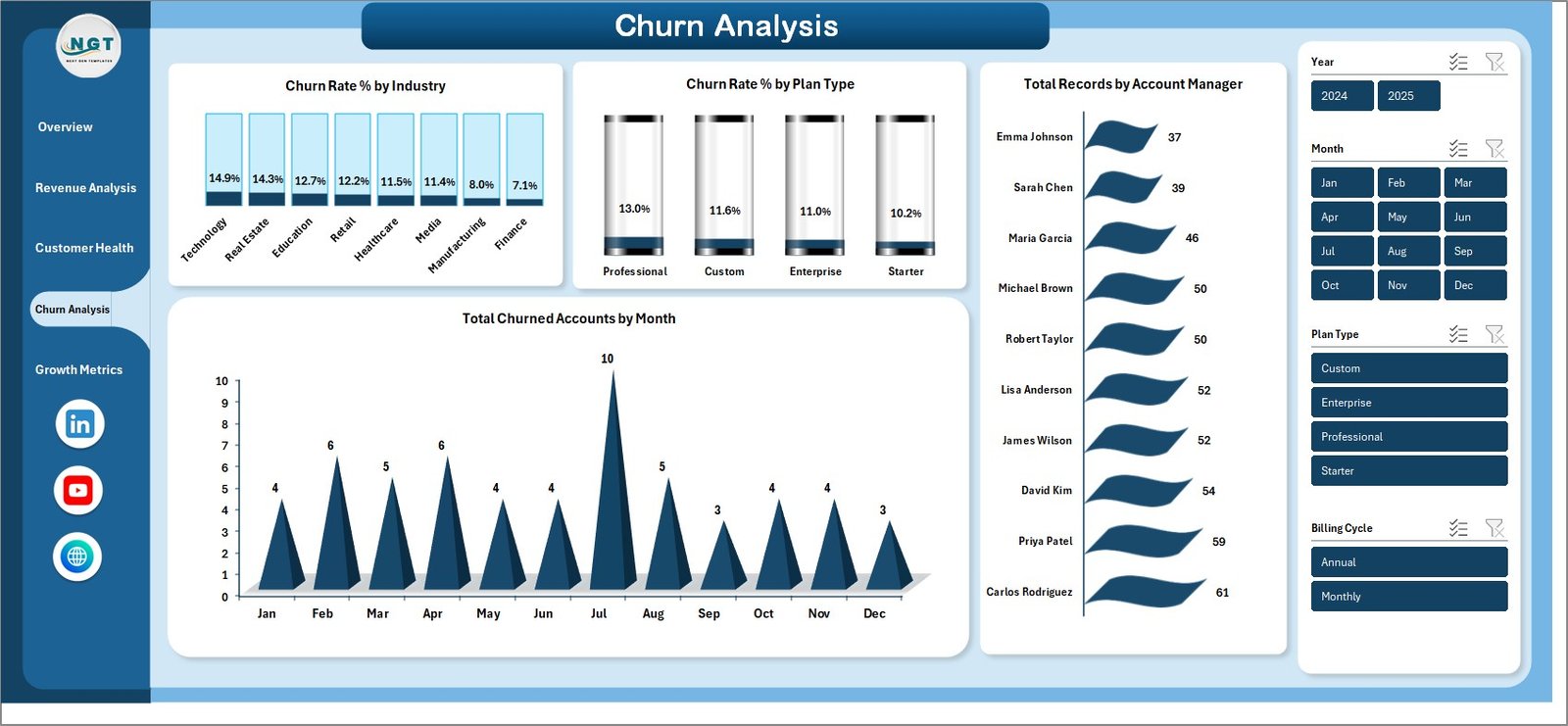
📉 Churn and Retention Tracking – Analyze churn rate by industry, churn rate by plan type, churned accounts by month, and overall retention rate percentage to identify and reduce customer attrition.
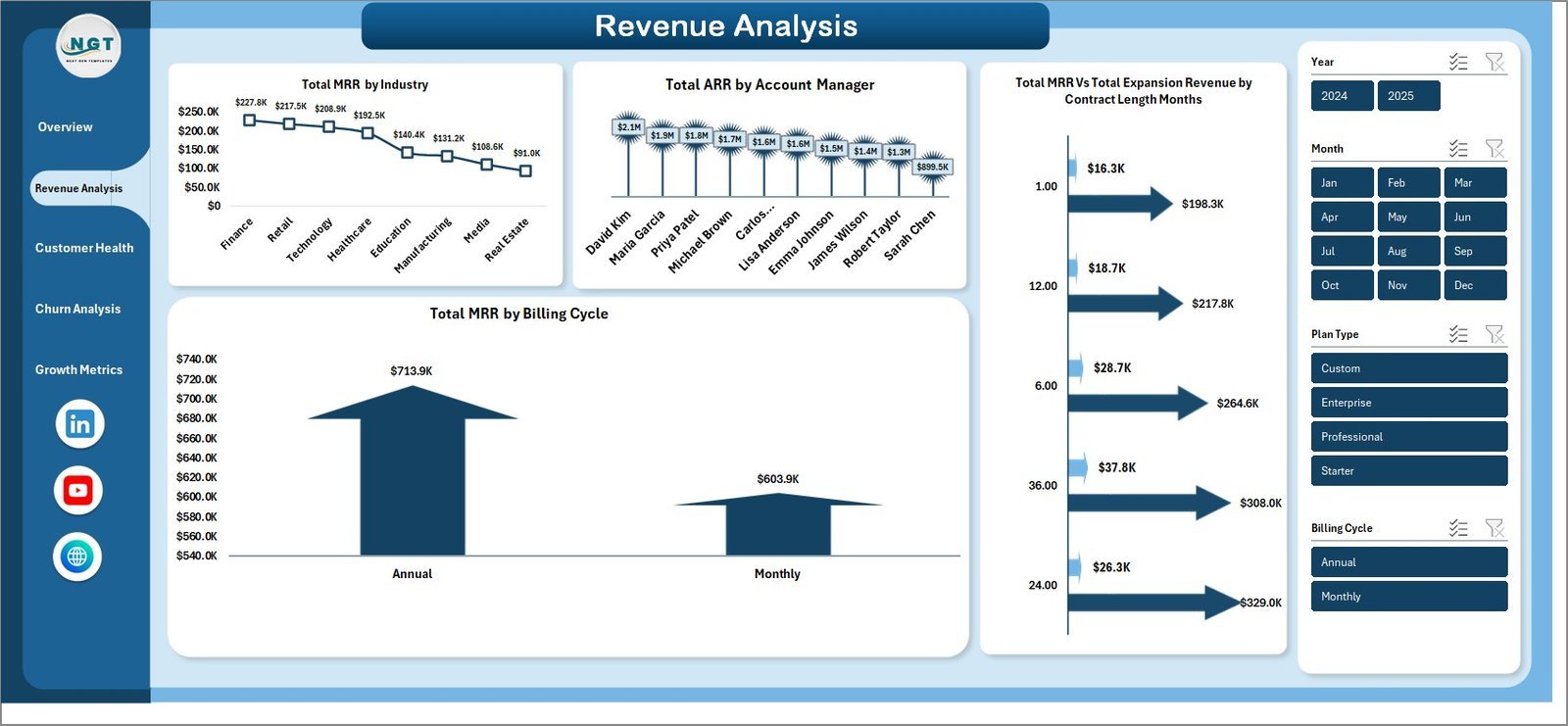
💰 Revenue Deep Dive – Explore MRR by industry, ARR by account manager, MRR by customer name, expansion revenue by company, and MRR by billing cycle for complete revenue visibility.
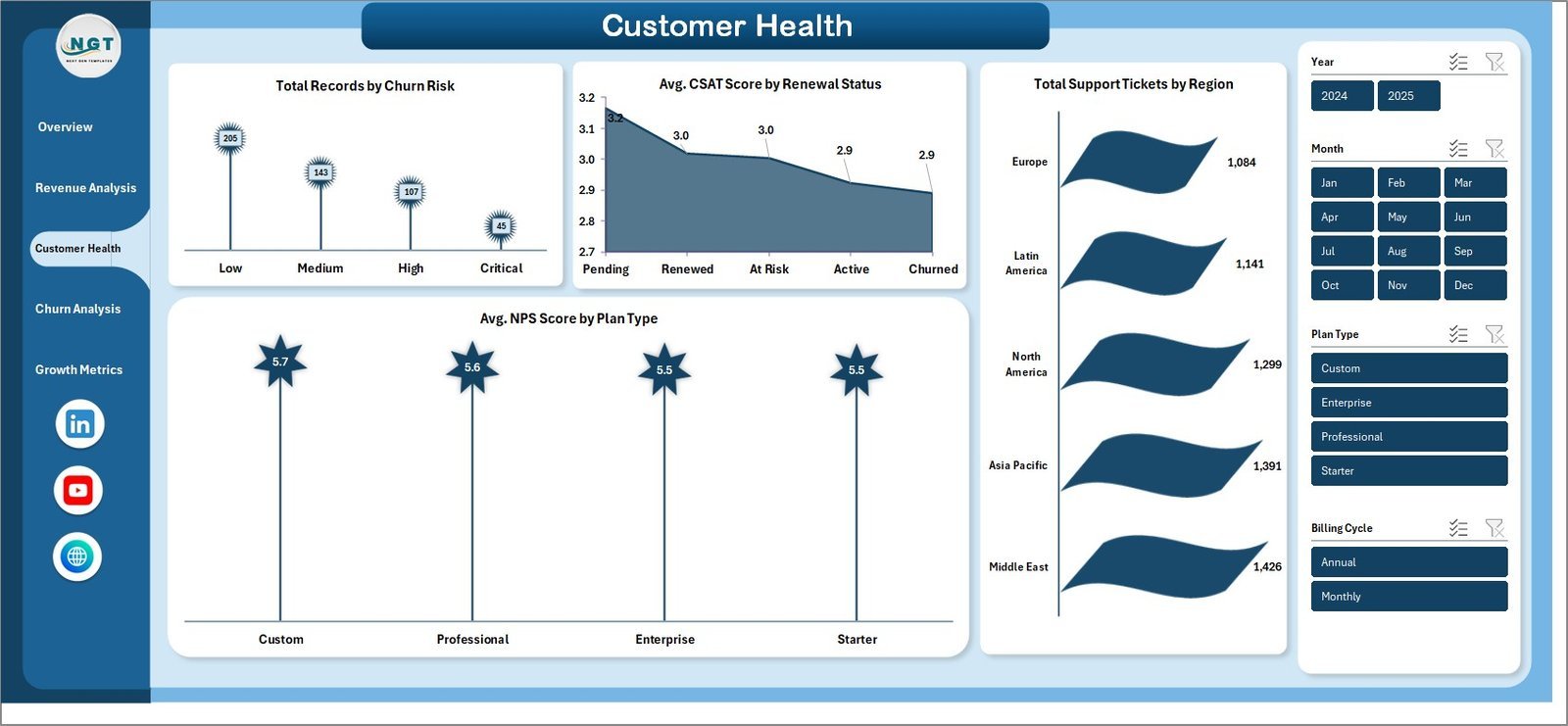
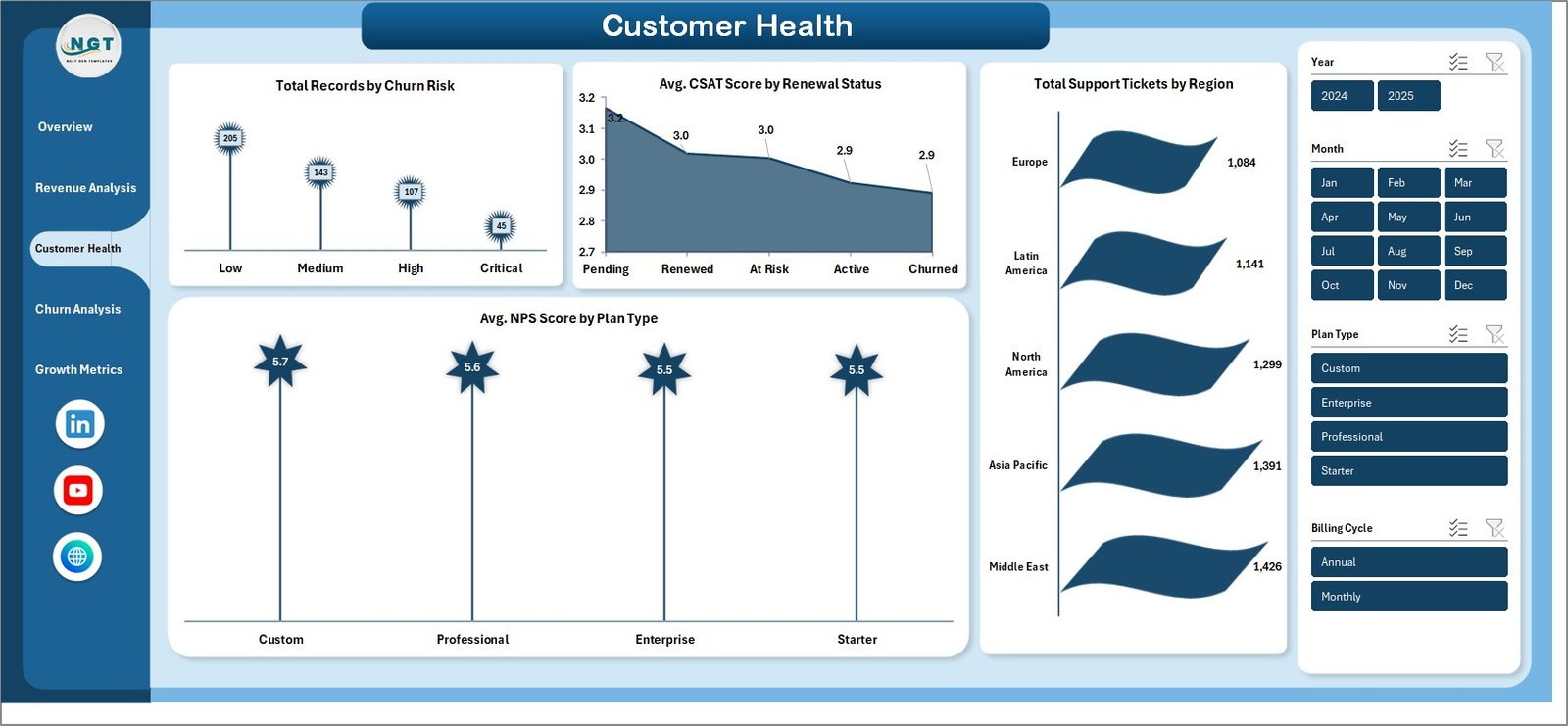
🏥 Customer Health Monitoring – Track records by churn risk, average CSAT score by renewal status, support tickets by region, and average NPS score by plan type to proactively manage customer success.
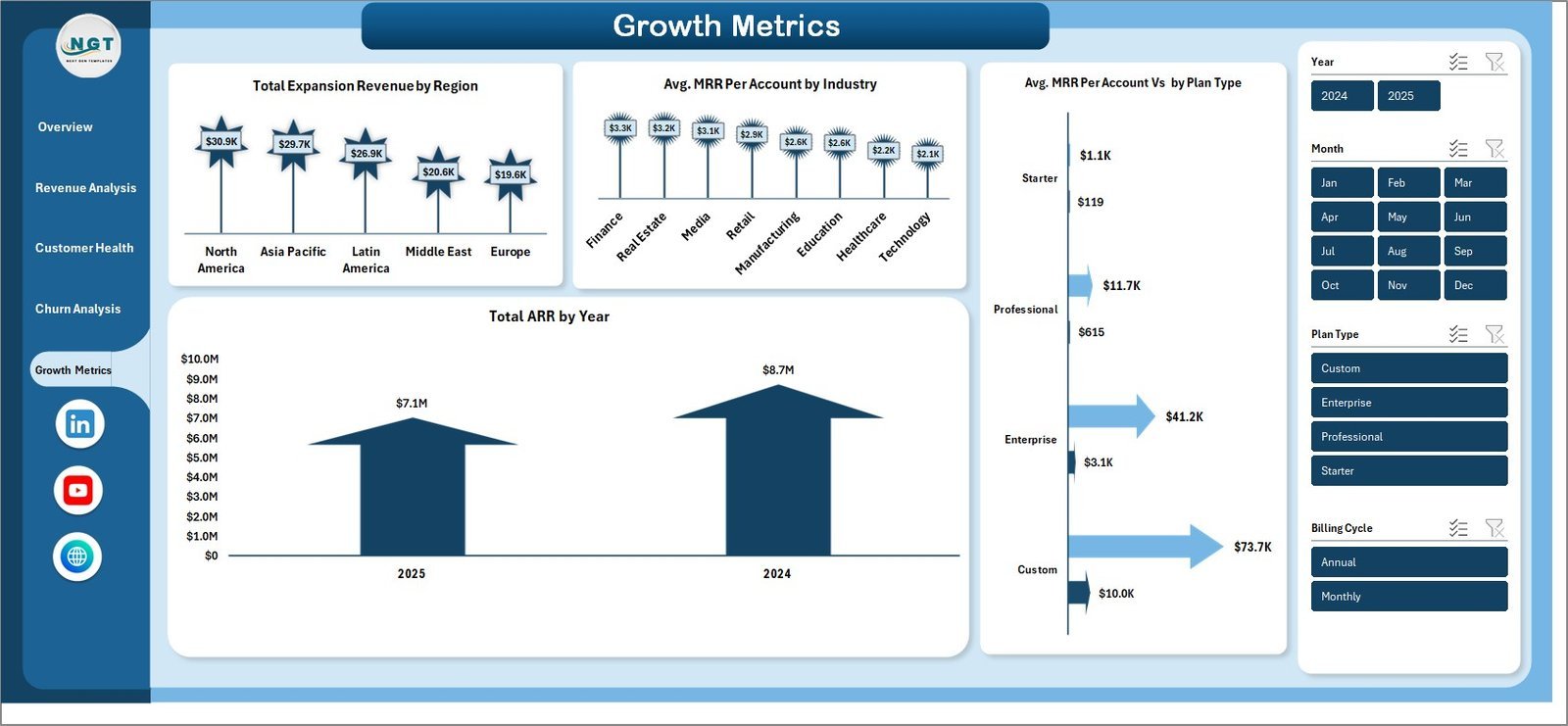
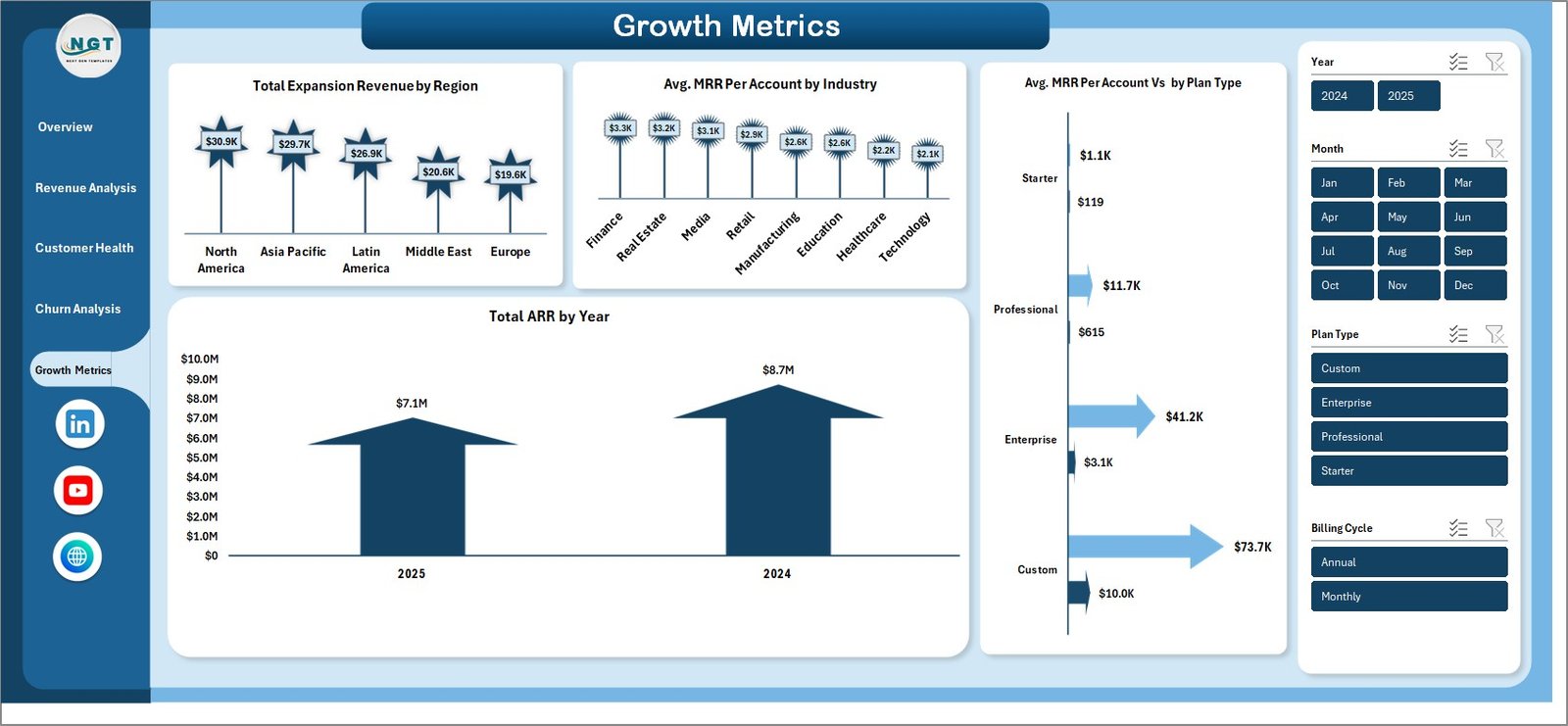
📊 Growth Metrics Analysis – Monitor expansion revenue by region, average MRR per account by industry, MRR per account by plan type, and total ARR by year to measure and accelerate business growth.
🔄 Fully Dynamic Pivot-Powered Engine – All charts and KPIs are powered by pivot tables in the Support Sheet. Simply update data and click Refresh All in the Data tab to update everything instantly.
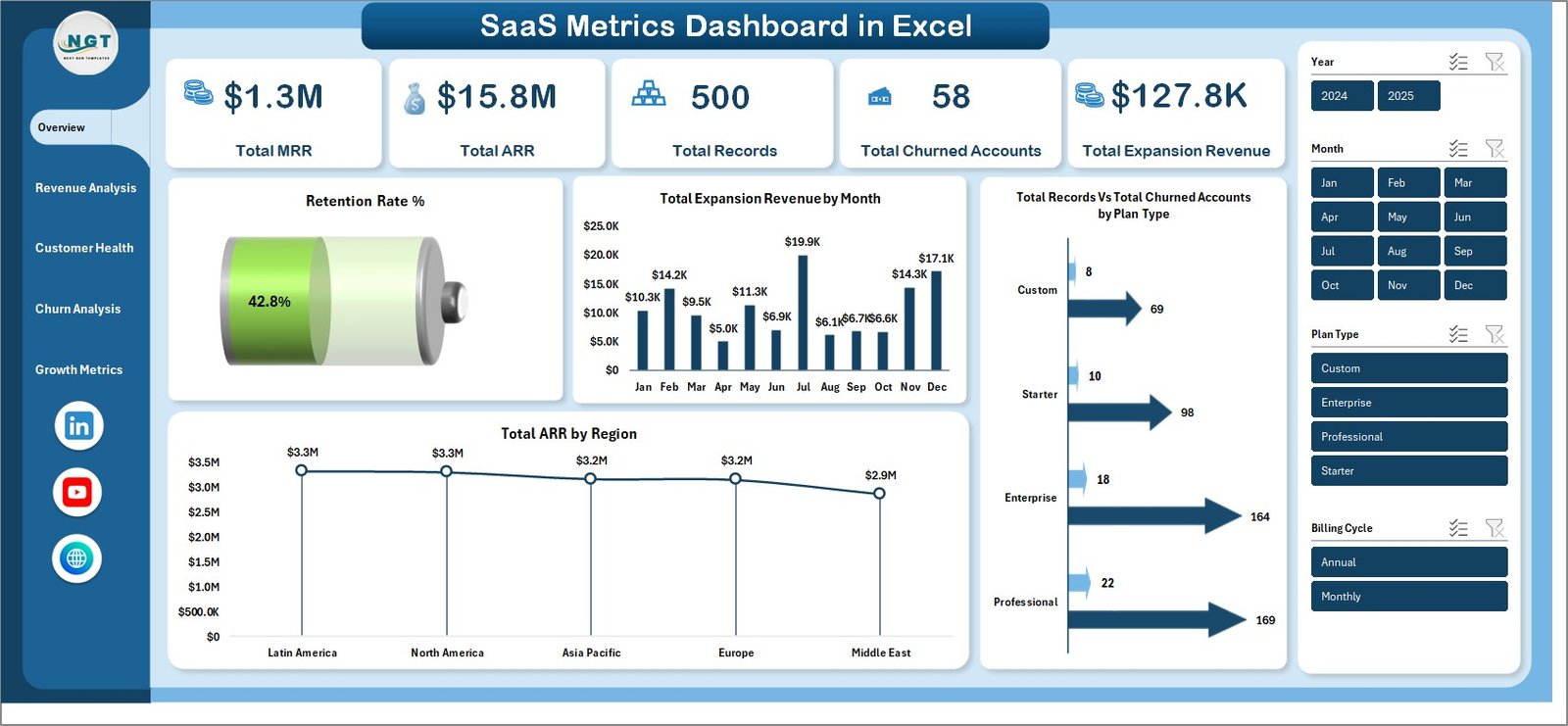
SaaS Metrics Dashboard in Excel
📦 What’s Inside the SaaS Metrics Dashboard in Excel
🔹 Overview Page – High-level KPI cards showing Total MRR, Total ARR, Total Records, Total Churned Accounts, and Total Expansion Revenue. Interactive charts display Retention Rate % by Overall, Total Expansion Revenue by Month, Total Records by Plan Type, and Total ARR by Region with multiple slicers for instant filtered analysis.
🔹 Revenue Analysis Page – Deep dive into subscription revenue with Total MRR by Industry, Total ARR by Account Manager, Total MRR by Customer Name, Total Expansion Revenue by Company Name, and Total MRR by Billing Cycle to understand where your revenue comes from and who drives it.
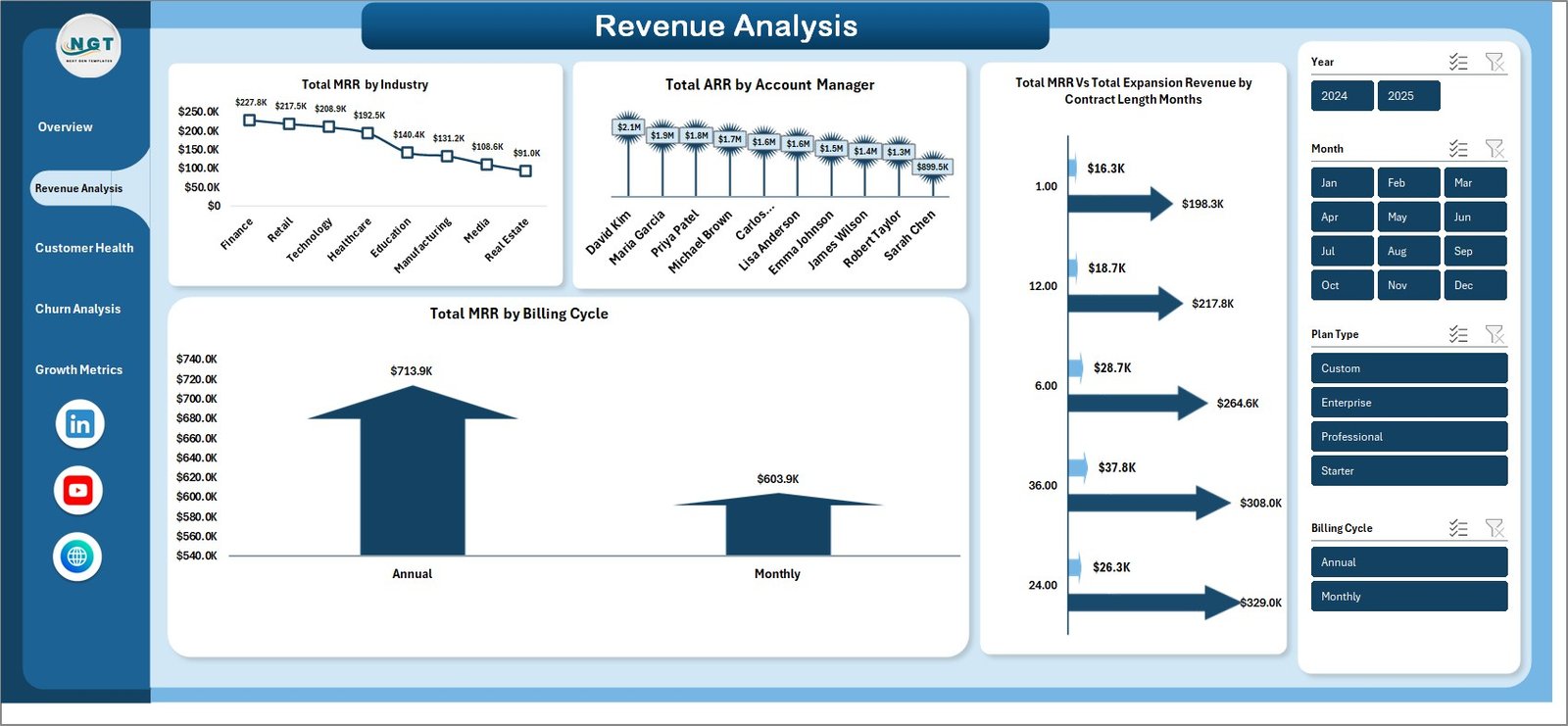
Revenue Analysis
🔹 Customer Health Page – Monitor customer wellness with Total Records by Churn Risk identifying at-risk accounts, Avg CSAT Score by Renewal Status measuring satisfaction across renewal segments, Total Support Tickets by Region tracking support demand geographically, and Avg NPS Score by Plan Type comparing loyalty across subscription tiers.
Customer Health
🔹 Churn Analysis Page – Understand and combat customer attrition with Churn Rate % by Industry revealing which sectors churn most, Churn Rate % by Plan Type comparing attrition across subscription tiers, Total Records by Account Manager measuring retention effectiveness per team member, and Total Churned Accounts by Month identifying seasonal churn patterns.
Churn Analysis
🔹 Growth Metrics Page – Track business expansion with Total Expansion Revenue by Region, Avg MRR Per Account by Industry, Avg MRR Per Account % by Plan Type, and Total ARR by Year to measure growth trajectory and identify high-potential segments.
Growth Metrics
🔹 Data Sheet – This is your raw data input sheet. Add your SaaS subscription data in the same format as the sample data provided. All dashboard pages pull from this sheet automatically.

Data Sheet
🔹 Support Sheet – Contains multiple pivot tables that power the entire dashboard dynamically. After updating data in the Data Sheet, go to the Data tab in Excel Ribbon and click Refresh All. All pivots and charts will refresh automatically. You can keep this sheet hidden during presentations.

Support Sheet
⚙️ How to Use the SaaS Metrics Dashboard in Excel
1️⃣ Download and unzip the file to your computer.
2️⃣ Open the Excel file in Microsoft Excel (2016 or later recommended).
3️⃣ Explore the sample data across all 5 dashboard pages to understand the layout and available analysis.
4️⃣ Go to the Data Sheet tab and replace the sample data with your actual SaaS subscription records.
5️⃣ Navigate to the Data tab in the Excel Ribbon and click Refresh All to update all pivot tables.
6️⃣ All charts, KPI cards, and slicers will update automatically with your data.
7️⃣ Use slicers and filters to drill down into specific plan types, regions, industries, or account managers.
👥 Who Can Benefit from This SaaS Metrics Dashboard
🔹 SaaS Founders and CEOs – Monitor MRR, ARR, churn, and expansion revenue to track business health and growth trajectory.
🔹 Revenue Operations Managers – Analyze revenue by industry, account manager, and billing cycle for data-driven sales optimization.
🔹 Customer Success Teams – Track churn risk, CSAT scores, NPS metrics, and support ticket volumes to proactively manage customer relationships.
🔹 Finance and FP&A Teams – Use ARR and MRR trends for financial planning, forecasting, and investor reporting.
🔹 SaaS Investors and Analysts – Evaluate subscription business performance with comprehensive metrics across retention, growth, and customer health dimensions.
❓ Frequently Asked Questions
What KPIs does the SaaS Metrics Dashboard in Excel track?
The SaaS Metrics Dashboard in Excel tracks 5 key performance indicators including Total MRR, Total ARR, Total Records, Total Churned Accounts, and Total Expansion Revenue. It also provides detailed analysis across retention rate, churn rate by industry, CSAT scores, NPS scores, and growth metrics across 5 interactive dashboard pages.
Do I need advanced Excel skills to use this template?
No. Simply replace the sample data in the Data Sheet with your own SaaS subscription data and click Refresh All in the Data tab. All pivot tables, charts, and KPI cards update automatically without any formula editing or VBA knowledge.
Can I track churn and retention with this dashboard?
Yes. The dedicated Churn Analysis page shows churn rate by industry, churn rate by plan type, churned accounts by month, and records by account manager. The Overview page also displays overall retention rate percentage for quick monitoring.
What is the best Excel template for tracking SaaS metrics like MRR and ARR?
The SaaS Metrics Dashboard in Excel is one of the best templates for tracking SaaS subscription metrics because it includes MRR and ARR tracking, churn analysis, customer health monitoring with CSAT and NPS scores, expansion revenue tracking, and growth metrics — all powered by dynamic pivot tables across 5 interactive pages.
Can I filter the dashboard by region or plan type?
Yes. The dashboard includes multiple slicers that let you instantly filter all charts and KPIs by plan type, region, industry, account manager, billing cycle, and other dimensions for focused analysis.
How does the Support Sheet work?
The Support Sheet contains multiple pivot tables that serve as the calculation engine for all dashboard charts and KPI cards. When you update data in the Data Sheet and click Refresh All, every pivot table recalculates and all visuals update automatically. You can keep this sheet hidden during presentations.
🔗 Explore Related Templates
🔹 SaaS Business KPI Dashboard in Google Sheets – Track MRR, churn, CAC, LTV, and more SaaS KPIs with an interactive Google Sheets dashboard.
🔹 Freelancer Business Dashboard in Excel – Monitor freelancer income, clients, projects, and profitability with dynamic Excel analytics.
🔹 Digital Marketing Campaign Dashboard in Excel – Track campaign performance, ROI, and marketing spend across channels in Excel.
📖 Click here to read the Detailed Blog Post
Watch the step-by-step video tutorial:


























Reviews
There are no reviews yet.